
Best AI Note-Taking Apps 2026
Taking notes in 2026 without AI is like writing code without autocomplete — technically possible, but why would you?
AI note-taking apps have exploded in the past year. They transcribe your lectures, summarize your meetings, generate flashcards, and some even quiz you on what you just learned. But with dozens of options flooding the market, finding the right one is harder than ever. Some are overhyped, some are overpriced, and a few are genuinely game-changing.
We spent weeks testing the most popular AI note-taking apps to find out which ones actually deliver. Whether you're a student drowning in lectures, a professional sitting through back-to-back meetings, or a lifelong learner who just wants smarter notes — here's what actually works.
What Makes a Great AI Note-Taking App in 2026?
Before diving into individual apps, let's set the bar. A great AI note-taking app should:
- Transcribe accurately — Whether it's a live lecture, a Zoom call, or a voice memo, transcription needs to be reliable.
- Summarize intelligently — Not just shorter text, but actual distilled insights.
- Help you study or review — Flashcards, quizzes, or AI chat about your notes.
- Accept multiple input types — Audio, PDFs, photos, typed notes.
- Be affordable — $10-20/month for a note app is a hard sell for students.
As one Reddit user summarized in a deep dive reviewing 25+ AI note-taking apps:
"The world of AI note-taking has gotten so crowded that most apps are just slight variations of the same thing — transcribe, summarize, done. The ones that stand out go further."— Reddit user in r/NoteTaking
That "going further" is exactly what separates the best from the rest. Let's break them down.
Best AI Note-Taking Apps Compared
1. Otter.ai — The Meeting Transcription King
Otter.ai has been the go-to transcription tool for professionals for years, and it's still solid in 2026. It integrates directly with Zoom, Google Meet, and Microsoft Teams — joining your meetings automatically and generating searchable transcripts with speaker identification.
- ✅ Excellent meeting transcription with speaker labels
- ✅ Auto-joins scheduled meetings
- ✅ Searchable transcript library
- ✅ Collaborative — share notes with teammates
- ❌ Focused mainly on meetings — not ideal for students
- ❌ Free tier is limited (300 minutes/month)
- ❌ Pro plan is $16.99/month — pricey for individual use
Best for: Professionals who live in meetings and need searchable, shareable transcripts.
2. Notion AI — The All-in-One Workspace
Notion added AI features to its already powerful workspace, letting you generate summaries, ask questions about your documents, and auto-fill databases. It's incredibly versatile, but that versatility comes with complexity.
- ✅ Powerful workspace with databases, wikis, and docs
- ✅ AI can summarize pages, generate content, and answer questions
- ✅ Great for project management alongside notes
- ❌ Steep learning curve — definitely not "open and start taking notes"
- ❌ AI add-on costs $10/month on top of the base plan
- ❌ No audio transcription — you need a separate tool for that
- ❌ Overkill if you just want smart notes
Best for: Power users who want notes integrated into a broader workspace and don't mind the setup time.
3. Notability — The Handwriting Favorite
Notability remains the iPad note-taking champion. Its handwriting experience is smooth, it syncs audio with your handwritten notes (so you can tap a word and hear what was being said when you wrote it), and it recently added some AI features.
- ✅ Best-in-class handwriting experience on iPad
- ✅ Audio recording synced to notes
- ✅ AI handwriting search and conversion
- ✅ Beautiful, distraction-free interface
- ❌ AI features are limited compared to AI-first apps
- ❌ No auto-generated flashcards or quizzes
- ❌ iPad-centric — less useful on other platforms
- ❌ $14.99/year subscription
Best for: Students and creatives who primarily take handwritten notes on iPad.
4. MelonNote — The AI Study Companion
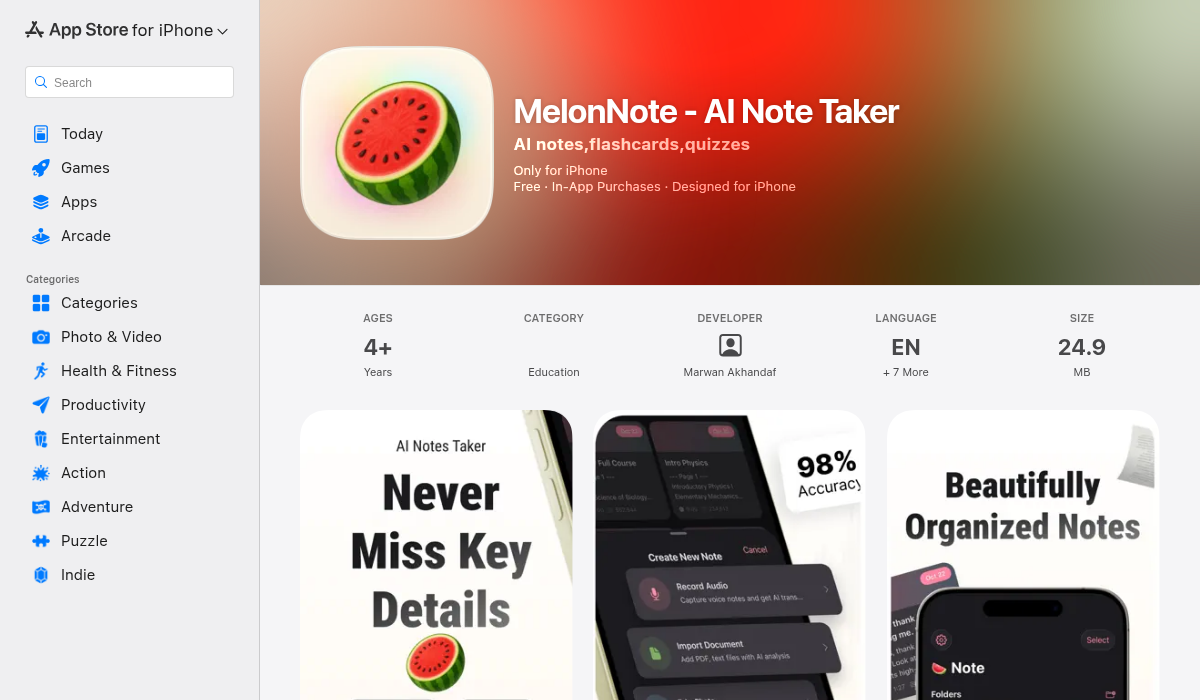
This is where things get interesting. MelonNote isn't just a note-taking app — it's an entire AI-powered study system. Record a lecture, and it doesn't just transcribe it. It generates a summary, creates flashcards, builds practice quizzes, lets you chat with an AI tutor about the material, and — here's the wild part — turns your notes into a podcast conversation you can listen to later.
- ✅ AI transcription powered by OpenAI Whisper
- ✅ Auto-generated summaries, flashcards, and quizzes
- ✅ AI tutor chat — ask questions about your study material
- ✅ AI podcast generator — turns notes into a 2-person podcast with 16+ voices
- ✅ Realtime AI conversation — like a study buddy who read all your notes
- ✅ Multiple input types: audio recording, PDF import, photo capture
- ✅ Visual summary generation (AI infographics)
- ✅ Cross-platform: iOS + Android
- ✅ Most affordable: $3.99/month (vs $10-20 for competitors)
- ❌ Newer app — smaller user base than established players
- ❌ No web version yet
What sets MelonNote apart is that it replaces multiple apps at once. Instead of using one app to record, another to make flashcards (Anki, Quizlet), and another for AI chat, MelonNote handles the entire study pipeline in one place. The podcast feature is genuinely unique — no other note-taking app converts your study material into listenable conversations.
Best for: Students and learners who want one app that handles recording, note-taking, studying, and review.
5. GoodNotes — The Organized Notebook
GoodNotes is Notability's main rival in the handwriting space, with a stronger focus on organization. Its AI features include handwriting recognition, spell check, and smart search across all notebooks.
- ✅ Excellent handwriting with shape recognition
- ✅ Strong organizational system (folders, notebooks, pages)
- ✅ AI-powered search across handwritten notes
- ✅ Available on iPad, iPhone, Mac, and now Windows
- ❌ AI features are mostly about search, not generation
- ❌ No audio transcription or flashcard generation
- ❌ $9.99/year or $29.99 one-time
Best for: Students who prefer organized digital notebooks with solid handwriting support.
Side-by-Side: Key Features Compared
Here's how the top contenders stack up on the features that matter most:
Audio Transcription:
- Otter.ai — ✅ Excellent (meeting-focused)
- Notion AI — ❌ Not available
- Notability — ⚠️ Records audio, limited transcription
- MelonNote — ✅ Full AI transcription (Whisper-powered)
- GoodNotes — ❌ Not available
AI Summaries:
- Otter.ai — ✅ Meeting summaries
- Notion AI — ✅ Page summaries
- Notability — ❌ Not available
- MelonNote — ✅ Note/lecture summaries + visual infographics
- GoodNotes — ❌ Not available
Flashcards & Quizzes:
- Otter.ai — ❌
- Notion AI — ❌
- Notability — ❌
- MelonNote — ✅ Auto-generated flashcards + practice quizzes (MCQ, true/false, fill-in-blank)
- GoodNotes — ❌
AI Chat/Tutor:
- Otter.ai — ⚠️ Can ask questions about transcripts
- Notion AI — ✅ Ask questions about your workspace
- Notability — ❌
- MelonNote — ✅ AI tutor + realtime voice conversation
- GoodNotes — ❌
AI Podcast Generation:
- Otter.ai — ❌
- Notion AI — ❌
- Notability — ❌
- MelonNote — ✅ 16+ voices, configurable hosts and duration
- GoodNotes — ❌
Monthly Price:
- Otter.ai — $16.99/mo (Pro)
- Notion AI — $10/mo (add-on)
- Notability — ~$1.25/mo ($14.99/yr)
- MelonNote — $3.99/mo
- GoodNotes — ~$0.83/mo ($9.99/yr)
Pro Tips for Getting the Most Out of AI Note-Taking
- Don't just transcribe — review the summary — Raw transcripts are long and messy. The real value is in the AI-generated summary. Read that first, then dive into the transcript for specifics.
- Use flashcards within 24 hours — The forgetting curve is real. If your app generates flashcards, review them the same day as the lecture. Apps like MelonNote that auto-generate these save you the creation step.
- Combine input types — Record the lecture audio, snap a photo of the whiteboard, import the PDF slides. The best AI apps can merge all of these into one comprehensive note.
- Talk to your notes — If your app has an AI chat feature, use it. Asking "What were the three main arguments in today's lecture?" is faster than re-reading everything.
- Listen on the go — If you're using MelonNote's podcast feature, generate a podcast from your lecture notes and listen during your commute. Passive review is surprisingly effective.
The Bottom Line
The "best" AI note-taking app depends on what you need:
- For meetings and professional use → Otter.ai is the industry standard.
- For handwritten notes on iPad → Notability or GoodNotes still reign.
- For a full AI study system → MelonNote packs the most AI features at the lowest price — transcription, summaries, flashcards, quizzes, AI tutor, and podcast generation in one app for $3.99/month.
- For a knowledge workspace → Notion AI is powerful if you're already in the Notion ecosystem.
If you're a student looking for the best bang for your buck, MelonNote is hard to beat. It's the only app that takes you from recording a lecture all the way to being quiz-ready — without needing any other tools. Available on both iOS and Android.