
Best Auto Clicker Apps for iPhone 2026
Finding a reliable auto clicker for iPhone is frustratingly difficult — most apps are either scams, require jailbreaking, or simply don't work as advertised.
If you've ever tried to automate repetitive tapping tasks on your iPhone — whether for grinding in idle games, testing apps, or just saving your thumbs from endless clicking — you know the struggle. Unlike Android, iOS has always been more restrictive about automation tools, leaving many users searching for workarounds that actually deliver.
In 2026, the landscape has finally improved. A handful of legitimate auto clicker apps now exist on the App Store, and we've tested the best options to help you find one that actually works without compromising your device's security or requiring complex workarounds.
Why iPhone Users Need Auto Clicker Apps
Auto clickers aren't just for gamers (though that's a big use case). Here's why people are increasingly looking for these tools:
- Idle and clicker games — Games like Cookie Clicker, Adventure Capitalist, and countless incremental games require thousands of taps to progress
- App testing and development — Developers need to simulate user interactions for stress testing
- Accessibility needs — Users with motor difficulties may need automated clicking assistance
- Repetitive tasks — Any scenario where you need to tap the same spot hundreds of times
The iPhone Auto Clicker Problem
If you've searched for auto clickers before, you've probably discovered why it's so frustrating on iOS. Reddit is full of users asking the same question:
"I have a spare phone that I just want to have the screen tapped every 5 minutes. I tried using the Switch Control in accessibility, but that doesn't work consistently..."— Reddit user in r/ios
The challenges are real:
- Apple's restrictions — iOS doesn't allow apps to control other apps the way Android does
- Scam apps — Many App Store listings promise auto clicking but deliver nothing
- Switch Control limitations — Apple's built-in accessibility feature is clunky and unreliable for automated clicking
- Jailbreak requirements — Some solutions require jailbreaking, which voids warranties and creates security risks
"Auto clicker on Android is way better than on iPhone, not to mention the auto clicker apps they don't work and almost all of them they make you pay..."— Reddit user in r/SummonersGreed
The good news? 2026 has brought some legitimate solutions that actually work within Apple's guidelines.
Best Auto Clicker Apps for iPhone in 2026
We tested over a dozen apps claiming to offer auto clicking functionality on iPhone. Here are the ones that actually deliver — ranked by effectiveness, ease of use, and value.
1. Auto Clicker — Automatic Tapper
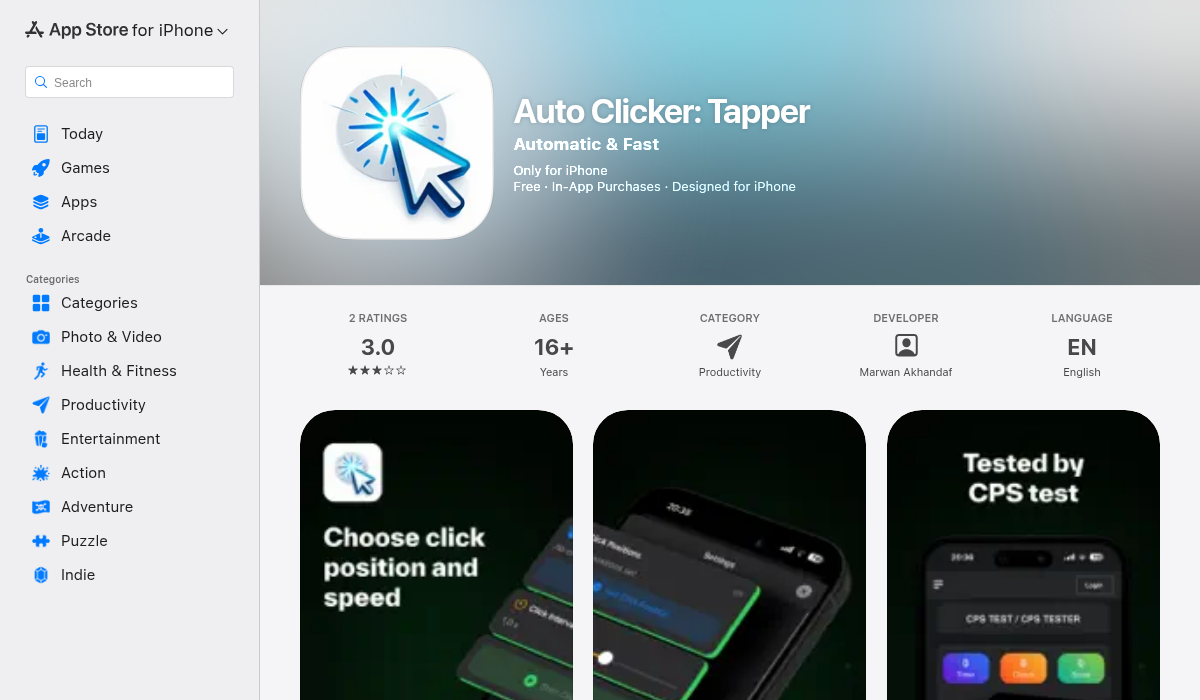
This is our top recommendation for iPhone users in 2026. Unlike many competitors, Auto Clicker actually delivers on its promise with a clean, intuitive interface and reliable performance.
What makes it stand out:
- ✅ Truly works on iOS — Uses clever workarounds within Apple's guidelines
- ✅ Multi-point clicking — Set up multiple tap locations for complex automation
- ✅ Adjustable intervals — Control click speed from milliseconds to seconds
- ✅ No jailbreak required — Works on any iPhone running iOS 15 or later
- ✅ Clean dark mode interface — Easy on the eyes during extended sessions
- ✅ Background operation — Continues clicking even when minimized
The app uses a floating overlay system that lets you position click targets anywhere on screen. You simply set your tap locations, adjust the timing, and let it run. It's particularly effective for idle games where you need consistent tapping in specific areas.
Pricing: Free with optional premium features. The free version handles most use cases.
Download Auto Clicker — Automatic Tapper
2. Auto Clicker — Automatic Tap
Another solid option that's been around for a while. This app takes a slightly different approach with its interface but delivers similar functionality.
- ✅ Simple setup process
- ✅ Supports single and multi-tap modes
- ✅ Customizable click duration
- ❌ Interface feels dated compared to newer apps
- ❌ Some features locked behind paywall
It gets the job done, but the user experience isn't as polished. If you're looking for basic auto clicking and don't mind a steeper learning curve, it's worth trying.
3. Auto Clicker — Auto Tap
A lightweight alternative that focuses on simplicity. Good for users who just need basic single-point clicking without advanced features.
- ✅ Minimal, easy-to-use interface
- ✅ Quick setup — under a minute to start clicking
- ❌ Limited customization options
- ❌ No multi-point support in free version
4. Using iOS Switch Control (Built-in Option)
Before downloading any app, you might want to try Apple's built-in accessibility feature. While it's not designed for auto clicking, it can be configured to simulate taps.
How to set it up:
- Go to Settings → Accessibility → Switch Control
- Enable Switch Control
- Configure a switch (can use your camera or screen)
- Set up auto-tap behavior in the scanning options
The verdict: It works for some use cases, but it's clunky, unreliable, and wasn't designed for this purpose. Most users find dedicated auto clicker apps far more practical.
How Auto Clickers Actually Work on iPhone
You might be wondering how these apps work given iOS restrictions. Here's what's happening under the hood:
The overlay method: Apps like Auto Clicker use floating overlays that sit on top of other apps. When you "click," the app briefly hides the overlay to pass the touch through to the underlying app, then restores it. This happens so fast it feels seamless.
Screen recording approach: Some apps require screen recording permission to track where you want to click. They then simulate touches in those recorded positions.
Accessibility integration: The most sophisticated apps integrate with iOS accessibility APIs to trigger touches, similar to how assistive touch works.
None of these methods require jailbreaking — they work within Apple's guidelines, which is why they're allowed on the App Store.
Best Use Cases for iPhone Auto Clickers
Idle and Clicker Games
This is the most common use case. Games like:
- Cookie Clicker
- Adventure Capitalist
- Egg, Inc.
- Tap Titans
- Summoner's Greed
These games reward constant tapping, and an auto clicker lets you progress while doing other things — or even overnight.
App and Game Testing
Developers can use auto clickers to stress test UI elements, verify button responsiveness, or simulate user sessions without manual input.
Accessibility Assistance
For users with motor difficulties or repetitive strain injuries, auto clickers can reduce the physical demand of using touch-based apps.
Pro Tips for Using Auto Clickers Effectively
- Start slow — Begin with longer intervals (500ms+) to avoid triggering anti-cheat systems in games
- Use multiple tap points — For games that require varied clicking, set up 2-3 click locations that cycle
- Enable Do Not Disturb — Notifications can interrupt auto clicking sessions
- Keep your phone plugged in — Extended auto clicking drains battery quickly
- Disable Auto-Lock — Go to Settings → Display & Brightness → Auto-Lock → Never (during sessions)
- Test in safe scenarios first — Make sure the click positions are correct before running for hours
What About Sideloading and Jailbreaking?
You might see recommendations for sideloading apps like AutoTouch or using jailbreak tweaks. Here's our honest assessment:
Sideloading (AltStore, SideStore): Technically possible but requires re-signing apps every 7 days and involves more complexity than most users want. The App Store options have improved enough that sideloading isn't necessary for most people.
Jailbreaking: Gives you the most powerful auto clicker options, but at significant cost — voided warranties, security vulnerabilities, and potential app compatibility issues. Not recommended unless you're an advanced user who understands the risks.
For 95% of users, a legitimate App Store auto clicker app will meet your needs without the hassle or risk.
Things to Avoid
When searching for auto clicker apps, watch out for:
- Apps requiring excessive permissions — An auto clicker shouldn't need access to your contacts or location
- Suspiciously high subscription prices — Some apps charge $10+/month for basic features
- Apps with no reviews or only 5-star reviews — Likely fake or manipulated
- Promises of "background clicking in any app" — iOS doesn't allow this; be skeptical of such claims
The Bottom Line
Finding a working auto clicker for iPhone used to be nearly impossible. In 2026, you finally have legitimate options that work within Apple's guidelines without jailbreaking or complex workarounds.
For most users, Auto Clicker — Automatic Tapper offers the best combination of features, reliability, and ease of use. Its multi-point clicking, adjustable intervals, and clean interface make it our top pick for idle games, app testing, or any scenario requiring automated tapping.
Whatever you choose, start with the free version to make sure it meets your needs before upgrading. And remember — use auto clickers responsibly, especially in competitive games where automation might violate terms of service.
Your thumbs will thank you.