
How to Redesign Your Room with AI: A Complete Guide for 2026
Staring at the same beige walls wondering if your living room could look like something from a design magazine? You're not alone — and in 2026, AI is finally making interior design accessible to everyone, not just those with $5,000 to spend on a decorator.
The frustration of interior design is real: you know you want change, but visualizing how different styles, colors, or furniture arrangements would actually look in your space feels impossible. Paint samples on walls only tell part of the story. Furniture stores won't let you trial sofas in your living room. And hiring a professional designer? That's a luxury most of us can't justify for a bedroom refresh.
The Visualization Problem Everyone Faces
Here's what traditionally happens when you want to redesign a room: You spend hours on Pinterest saving ideas that look nothing like your actual space. You buy throw pillows hoping they'll tie everything together. You paint one wall, hate it, and live with it for three years because repainting feels overwhelming.
"I tried the Interior Redesign AI web app and really liked how quickly it reimagined my room in different styles just from a photo, which helped me experiment with moving walls and cabinet layouts without much hassle."— Reddit user in r/homedesign
The problem isn't a lack of taste or ideas — it's the inability to see those ideas applied to your actual room before committing time and money. That's exactly where AI room planners have stepped in.
How AI Room Redesign Actually Works
Modern AI interior design tools use generative models trained on millions of professionally designed spaces. You upload a photo of your room, and the AI analyzes the layout, lighting, and existing elements. Then it generates photorealistic renderings of your space in completely different styles — all in seconds.
No 3D modeling skills required. No complicated software. Just a photo from your phone and a few taps.
What makes this particularly useful is the speed of iteration. Instead of imagining whether a mid-century modern look would work in your space, you can see it. Don't like it? Try Scandinavian minimalist. Or industrial. Or cozy farmhouse. The AI generates each variation in seconds, letting you explore dozens of possibilities in the time it would take to browse one furniture store.
What to Look for in an AI Room Planner
Not all AI design tools are created equal. After testing several options that Reddit users recommended — from web-based platforms to mobile apps — here's what separates the genuinely useful from the frustrating:
- Realistic output quality — The best tools generate images that look like actual interior photography, not obviously AI-generated art
- Style variety — Look for apps offering 15+ distinct styles, from minimalist to bohemian to classic
- Element preservation — Good AI keeps your room's fixed elements (windows, doors, architectural features) intact while reimagining furniture and decor
- Speed — Generation should take seconds, not minutes
- Mobile-first design — Being able to snap a photo and get results immediately makes a huge difference
"REimagineHome AI is handy for flipping an empty room into anything you need! We used this tool ourselves and loved how quickly it showed over 50 styles right on our photo."— Reddit user in r/InteriorDesignHacks
Top AI Room Design Apps Compared
1. RoomGPT
One of the original AI room redesign tools, RoomGPT gained popularity for its simplicity. Upload a photo, pick a style, and get your redesign. The web-based platform works well on desktop, though the free tier is quite limited.
- ✅ Simple, straightforward interface
- ✅ Quick generation times
- ❌ Limited free generations
- ❌ Web-only (no mobile app)
- ❌ Fewer style options than competitors
2. Spacely AI
Spacely AI focuses on photorealistic output and has built a strong following in the interior design community. The results genuinely look like professional interior photography rather than AI art.
- ✅ Excellent image quality
- ✅ Good style variety
- ❌ Subscription can get pricey for casual users
- ❌ Primarily web-based
3. Baytee – AI Room Planner
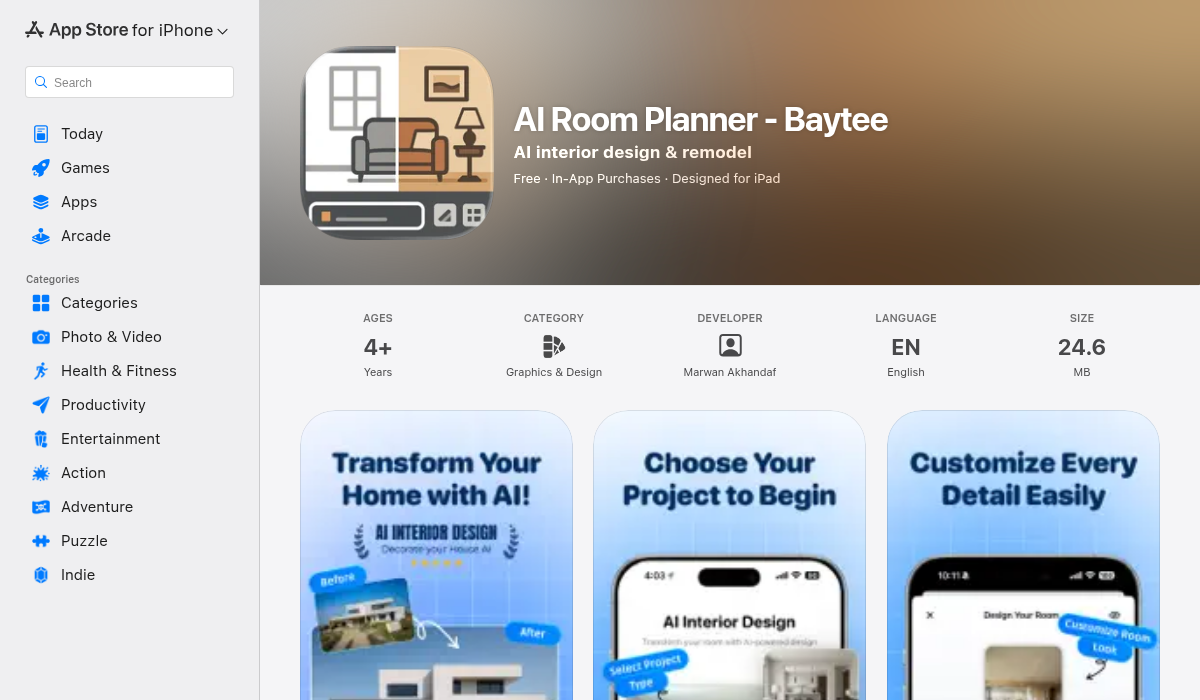
Baytee takes a mobile-first approach to AI room design, which makes a surprising difference in practice. Snap a photo directly from the app, choose your style, and see your redesigned room in seconds — all without leaving your couch.
What sets Baytee apart is its focus on practical design exploration. Beyond full room redesigns, you can swap out specific elements like flooring or wall colors to test individual changes before committing. The before/after comparison feature helps you understand exactly what's different in each design.
- ✅ Native iOS app with camera integration
- ✅ Flooring and wall color swaps
- ✅ Before/after comparison slider
- ✅ Freestyle descriptions for custom styles
- ✅ Save and share designs easily
- ❌ iOS only (no Android yet)
The freestyle description feature is particularly interesting — instead of picking from preset styles, you can describe exactly what you want: "cozy Scandinavian with warm wood tones and lots of plants" or "modern minimalist with Japanese influences." The AI interprets your description and applies it to your actual room.
Pro Tips for Getting the Best AI Room Designs
- Good lighting matters — Take photos during the day with natural light. Dark, poorly lit photos give the AI less information to work with, resulting in lower quality outputs.
- Capture the full room — Stand in a corner and angle your camera to show as much of the room as possible. The AI needs context about the full space to generate realistic redesigns.
- Clear the clutter first — While AI can work with messy rooms, you'll get better results if you tidy up first. The AI might incorporate that laundry basket into your "minimalist" design.
- Try multiple angles — Different perspectives can yield very different design suggestions. That awkward corner might look amazing from another angle.
- Use specific style descriptions — Instead of generic terms like "modern," try "mid-century modern with warm earth tones" or "Scandinavian with blue accents."
Real-World Use Cases
AI room design isn't just for daydreaming. Here's how people are actually using these tools:
Pre-purchase visualization: Before buying that $2,000 sectional sofa, see how the style fits your space. It won't show the exact item, but it'll show whether the aesthetic works.
Rental decorating: Can't paint or make permanent changes? AI helps you see what's possible with furniture, textiles, and decor alone.
Selling or staging: Real estate agents use AI room design to show buyers the potential of empty or dated spaces.
Design communication: Trying to explain your vision to a partner or contractor? Generate AI images to show exactly what you mean.
The Bottom Line
AI room redesign tools have matured significantly. What started as novelty tech now genuinely helps people make better design decisions and avoid expensive mistakes. Whether you're planning a full renovation or just wondering if that accent wall is a good idea, being able to visualize changes before committing is invaluable.
For casual exploration and quick what-if scenarios, mobile apps like Baytee offer the most frictionless experience — snap a photo, tap a style, and see your room transformed in seconds. For more detailed professional work, web-based tools with more customization options might be worth the learning curve.
Either way, the days of staring at paint chips and hoping for the best are officially over.