
How to Track Baby Milestones: Best Apps for Parents
First smile. First steps. First words. These moments happen once — and new parents often wonder if their baby is hitting milestones at the right time.
Tracking your baby's development shouldn't add stress to already exhausted parents. The best milestone apps make it simple: log achievements, get age-appropriate activity suggestions, and know when to talk to your pediatrician. We reviewed the top options to help you find the right fit.
Why Milestone Tracking Matters
The CDC and pediatric organizations provide developmental guidelines for a reason. Early identification of delays leads to early intervention — and better outcomes. But keeping track of dozens of milestones across motor skills, language, social-emotional development, and cognitive growth? That's overwhelming without help.
"My mom kept a first year calendar for me which included milestones like grabbing toys, sitting up, etc. I have always loved that so I am doing the same for my daughter."— Reddit user in r/NewParents
Today's parents have better tools than paper calendars. The right app combines milestone checklists, developmental guidance, and practical activity suggestions — all in one place.
What Makes a Good Milestone Tracker
We evaluated apps based on these criteria:
- Medical accuracy — Does it follow CDC or pediatric guidelines?
- Ease of use — Can sleep-deprived parents navigate it quickly?
- Activity suggestions — Does it recommend age-appropriate activities?
- Tracking features — Sleep, feeding, diapers, and growth logging
- Privacy — Is your baby's data kept secure?
Best Baby Milestone Apps in 2026
1. Huckleberry
Huckleberry is best known for its sleep tracking and predictive sleep analysis. While it includes milestone tracking, its core strength is helping parents optimize nap schedules and bedtimes.
- ✅ Excellent sleep tracking and predictions
- ✅ Partner/caregiver sync
- ✅ Basic milestone tracking included
- ❌ Sleep-focused — milestones are secondary
- ❌ Premium features require subscription
2. Baby Sparks
Baby Sparks focuses heavily on developmental activities. It provides 4+ activity suggestions daily, covering all developmental domains. Parents on Reddit praise its variety, though the full version requires payment.
- ✅ Extensive activity library
- ✅ Video demonstrations of activities
- ✅ Expert-backed content
- ❌ Full access requires subscription
- ❌ Can feel overwhelming with too many suggestions
3. Baby Steps — Milestone Tracker
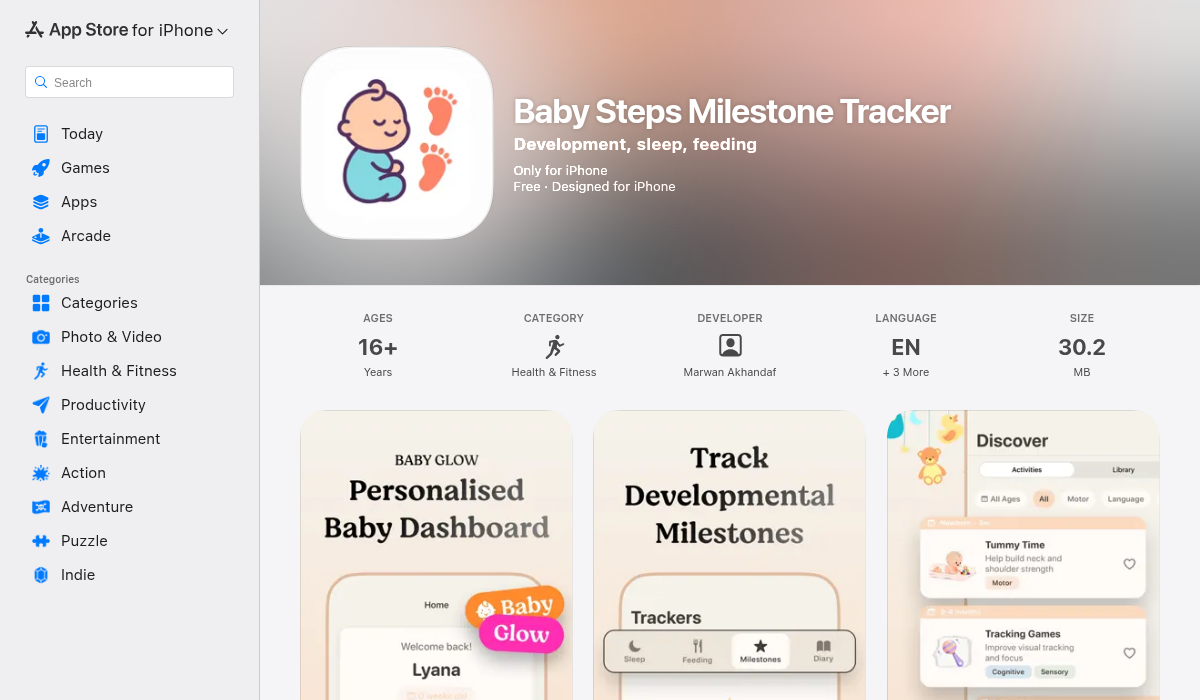
Baby Steps takes a focused approach to milestone tracking. Built around CDC developmental guidelines, it gives parents clear checklists organized by age and skill type. What sets it apart is the combination of authoritative milestone information with practical daily tracking.
- ✅ CDC-aligned developmental milestones
- ✅ Comprehensive tracking — sleep, feeding, diapers
- ✅ Age-appropriate activity suggestions
- ✅ Learning library with parenting resources
- ✅ Reminders to keep parents on track
- ✅ Clean, intuitive interface
- ❌ iOS only (no Android version yet)
Baby Steps strikes the right balance between comprehensive and overwhelming. The CDC-based milestones give parents confidence they're tracking what matters, while the activity suggestions help turn screen time into quality development time. The learning library is a bonus — short, practical articles on common parenting questions.
4. Baby Tracker
Baby Tracker is a classic choice for logging daily care — feeds, diapers, sleep, pumping sessions. It's simple and reliable, though milestone tracking is minimal compared to specialized apps.
- ✅ Reliable daily tracking
- ✅ Partner sync works well
- ✅ Simple interface
- ❌ Milestone tracking is basic
- ❌ No activity suggestions
5. Pip Baby Tracker
A newer option, Pip focuses on simplicity. No ads, no subscriptions, just straightforward tracking. Good for parents who find other apps too complex, though it lacks the developmental guidance of more comprehensive tools.
- ✅ Modern, clean design
- ✅ No ads or subscriptions
- ✅ Customizable tracking
- ❌ Limited milestone guidance
- ❌ Fewer features overall
Pro Tips for Milestone Tracking
- Don't compare obsessively — Milestone ranges are wide for a reason. Some babies walk at 9 months, others at 15 months. Both are normal.
- Use the activities — Apps with activity suggestions are only useful if you actually do them. Even 5 minutes of tummy time counts.
- Share with your pediatrician — Bring your tracking data to well-child visits. It helps your doctor see patterns you might miss.
- Involve both parents — Look for apps with partner sync. Tracking is easier when it's shared.
- Trust your instincts — Apps provide guidance, not diagnoses. If something feels off, talk to your pediatrician regardless of what the app says.
The Bottom Line
For sleep-focused families, Huckleberry's predictive tools are excellent. For activity-rich development, Baby Sparks delivers variety. For simple daily logging, Baby Tracker does the job.
If you want a balanced approach — CDC-aligned milestones, practical activity suggestions, comprehensive tracking, and a learning library — Baby Steps combines everything new parents need without overwhelming them.
Every baby develops at their own pace. The right app helps you celebrate the milestones as they come, while giving you confidence that development is on track.