
How to Track Food Allergies: Complete App Guide 2026
Managing food allergies in 2026 shouldn't feel like a full-time job—but for millions of people, it does.
Whether you're dealing with a peanut allergy, gluten intolerance, dairy sensitivity, or managing multiple dietary restrictions at once, staying safe means constant vigilance. Reading every label. Asking awkward questions at restaurants. Living with the low-grade anxiety that comes from knowing one wrong ingredient could ruin your day—or worse.
The good news? Technology has finally caught up. Food allergy tracking apps have evolved significantly, offering everything from barcode scanning to ingredient analysis to symptom logging. But with dozens of options available, finding the right one can be overwhelming. We tested the most popular apps to help you find what actually works.
Why Tracking Food Allergies Is More Important Than Ever
Food allergies affect approximately 32 million Americans, with rates continuing to climb year over year. Unlike seasonal allergies that cause temporary discomfort, food allergies can trigger serious reactions—from digestive issues and skin problems to anaphylaxis in severe cases.
The challenge isn't just avoiding known allergens. It's the hidden ingredients, cross-contamination risks, and the sheer mental load of constantly being on guard. Many people end up keeping notes in their phone, spreadsheets, or just relying on memory—none of which are reliable systems.
"I'd like to know as much as I can about my allergies changing so I can share with my allergist at the next appointment. I usually keep track of these things in my notes app, but it's not very convenient."— Reddit user in r/FoodAllergies
This is exactly where dedicated allergy tracking apps come in. They turn scattered observations into actionable data, help identify trigger patterns you might miss, and give you something concrete to share with your doctor.
What to Look for in a Food Allergy App
Before diving into specific apps, let's talk about what features actually matter. Not every app will have everything, but the best ones should offer at least a few of these capabilities:
- Barcode scanning — Quickly check packaged foods for allergens
- Ingredient analysis — Understand what's actually in your food beyond the label
- Allergy profile setup — Configure your specific allergens once, get alerts everywhere
- Symptom tracking — Log reactions to identify patterns over time
- Database quality — More products = fewer "not found" frustrations
- Offline access — Critical for grocery shopping with spotty cell service
The reality is that no single app does everything perfectly. Some excel at scanning, others at tracking. The trick is finding the right tool—or combination of tools—for your specific situation.
Best Food Allergy Tracking Apps Compared
1. Yummly
Yummly started as a recipe app but has evolved into a comprehensive meal planning platform with over 20 million registered users. While it's not specifically designed for allergy tracking, its personalization features make it surprisingly useful for people with dietary restrictions.
You can set up a detailed taste profile that includes allergens and intolerances. Once configured, Yummly filters its massive recipe database to only show dishes that are safe for you. The app also suggests ingredient substitutions when a recipe contains something you can't eat.
- ✅ Massive recipe database with allergen filtering
- ✅ Smart grocery lists that exclude your allergens
- ✅ Meal planning integration
- ❌ Not designed for scanning packaged foods
- ❌ Symptom tracking isn't a core feature
- ❌ Relies on recipe data—doesn't help at the store
Best for: Home cooks who want allergen-safe recipes rather than product scanning.
2. Fig Food App
Fig takes a more targeted approach to food allergies. The app lets you set up detailed dietary restrictions—not just common allergens like peanuts and dairy, but also specific ingredients, FODMAPs, and even preferences like low-sodium or keto.
The standout feature is its restaurant menu scanning. Point your camera at a menu, and Fig highlights dishes that match your dietary needs. For packaged foods, barcode scanning checks products against your profile and flags anything problematic.
- ✅ Restaurant menu scanning is genuinely useful
- ✅ Detailed allergen and dietary restriction profiles
- ✅ Community-sourced restaurant recommendations
- ❌ Subscription required for full features ($40/year)
- ❌ Database can be hit-or-miss for less common products
- ❌ US-focused—limited international product data
"$40/year is not a lot, true. But it's just upsetting personally to me because I have so many food restrictions already—which is small compared to some others—and there's still people trying to make a profit off it."— Reddit user in r/FoodAllergies
Best for: Dining out with confidence and scanning restaurant menus.
3. FoodCheckr
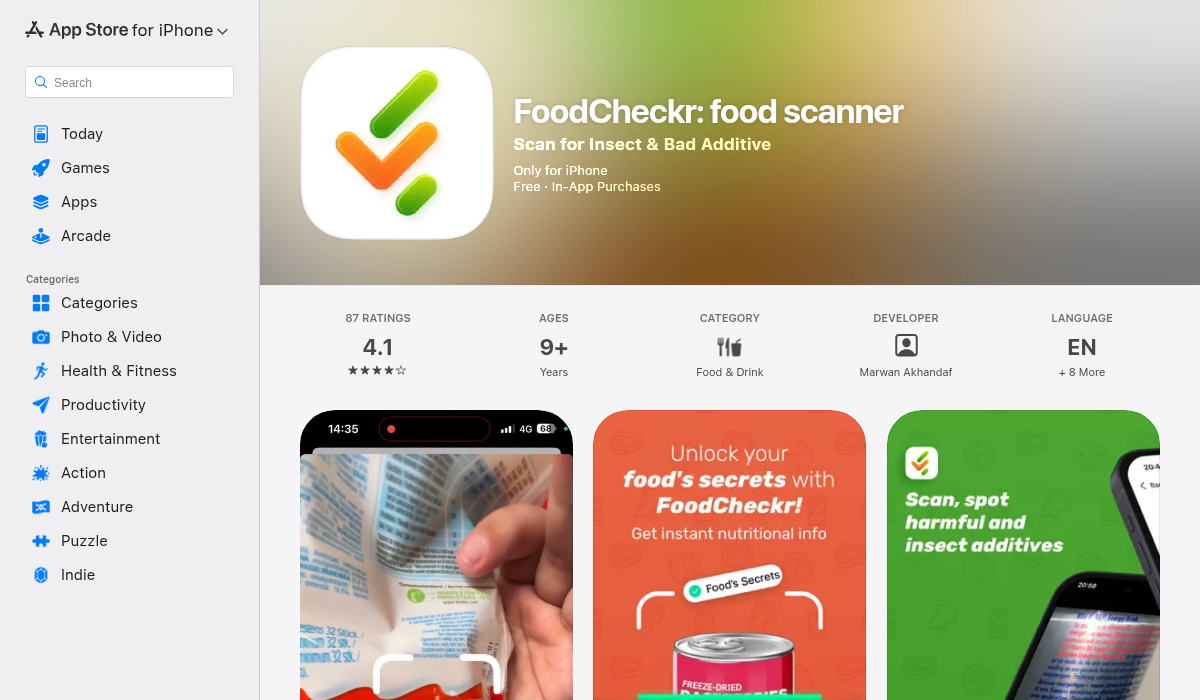
FoodCheckr takes a different approach by focusing on what matters most: instant ingredient analysis. Instead of maintaining a massive database that may or may not include your specific products, FoodCheckr uses AI to analyze ingredient lists directly.
Here's how it works: scan a barcode or take a photo of any ingredient list, and the app immediately identifies potential allergens and flags concerning ingredients. It's not limited to products in a database—if you can photograph the label, FoodCheckr can analyze it.
The app lets you set up allergen profiles for your entire family, so you can check products for everyone's restrictions in one scan. For parents managing children with allergies, this is a significant time-saver.
- ✅ AI-powered analysis works on any ingredient list
- ✅ Not dependent on pre-existing product database
- ✅ Family profiles for multiple allergen sets
- ✅ Works internationally—analyzes the text you show it
- ✅ Identifies hidden allergens and cross-contamination warnings
- ❌ Requires decent lighting for photo-based scanning
- ❌ Newer app, still building out features
Best for: Grocery shopping when you need to quickly verify any product's ingredients.
Pro Tips for Better Allergy Tracking
Having the right app is just the starting point. Here's how to get the most out of your food allergy management:
- Set up your profile completely — Don't skip the initial setup. The more detailed your allergen profile, the better these apps work. Include even "minor" sensitivities that might not cause severe reactions but still affect your wellbeing.
- Use multiple apps strategically — No single app does everything. Consider using one for scanning (like FoodCheckr) and another for recipes (like Yummly). Most are free to try, so experiment.
- Log symptoms consistently — If you're trying to identify a new allergy or intolerance, tracking matters. Even apps like Apple Health or a simple notes app can help you spot patterns when you're consistent about logging.
- Update when products change — Manufacturers change formulations more often than you'd think. That "safe" product from last year might have new ingredients. Re-scan regularly, especially for items you buy on autopilot.
- Share data with your doctor — Most allergy apps let you export your data. Bring this to your allergist appointments. Real-world data over weeks or months is far more valuable than trying to remember what you ate before a reaction.
When Apps Aren't Enough
While apps are powerful tools, they have limitations. They can miss newly reformulated products, struggle with restaurant cross-contamination, and can't account for every possible allergen variation. For severe allergies, always:
- Carry your EpiPen or prescribed medication
- Call ahead to restaurants and speak directly with kitchen staff
- Read physical labels even after scanning—formulations change
- Trust your instincts—if something seems off, don't eat it
Apps are a layer of protection, not a replacement for careful attention and medical advice.
The Bottom Line
Managing food allergies has never been easy, but the tools available in 2026 make it significantly more manageable. The key is finding apps that fit your specific needs:
- For home cooking and meal planning: Yummly's recipe filtering is hard to beat
- For restaurant dining: Fig's menu scanning feature stands out
- For grocery shopping and quick ingredient checks: FoodCheckr's AI-powered analysis works on any label
The best approach is often combining tools. Use a scanning app at the store, a recipe app at home, and a symptom tracker to identify patterns over time. Technology can't eliminate the challenges of living with food allergies, but it can make daily life considerably less stressful.
If you're tired of squinting at ingredient labels or wondering if a product is safe, give FoodCheckr a try—the AI-powered scanning works on products you won't find in traditional databases.