
How to Use AI to Study Smarter (Not Harder) in 2026
AI won't take your exams for you — but it can cut your study time in half if you use it right.
Students in 2026 have access to AI tools that would have seemed like science fiction just a few years ago. Apps that record your lectures and turn them into flashcards. Tools that generate practice quizzes from your notes. AI tutors that answer questions about your study material at 2 AM when no professor is available. The technology is there — the question is whether you're actually using it.
We tested over a dozen AI study apps to find out which ones genuinely save time and improve retention, and which ones are just glorified ChatGPT wrappers. Here's what we found.
Why Traditional Studying Is Broken
The typical student workflow looks like this: attend lecture, take notes (maybe), re-read notes before the exam, panic, cram, forget everything two weeks later. It's inefficient, stressful, and backed by zero science.
Research consistently shows that active recall (testing yourself) and spaced repetition (reviewing at increasing intervals) are the most effective study methods. Yet most students still rely on passive re-reading because creating flashcards and practice tests is tedious and time-consuming.
"I know flashcards work but I spend more time making them than actually studying. By the time I'm done creating the deck, the exam is tomorrow."— Reddit user in r/EngineeringStudents
This is exactly where AI changes the game. What used to take hours — transcribing lectures, creating flashcards, writing practice questions — now takes seconds.
The Best AI Study Apps in 2026
1. MelonNote — The All-in-One AI Study Companion
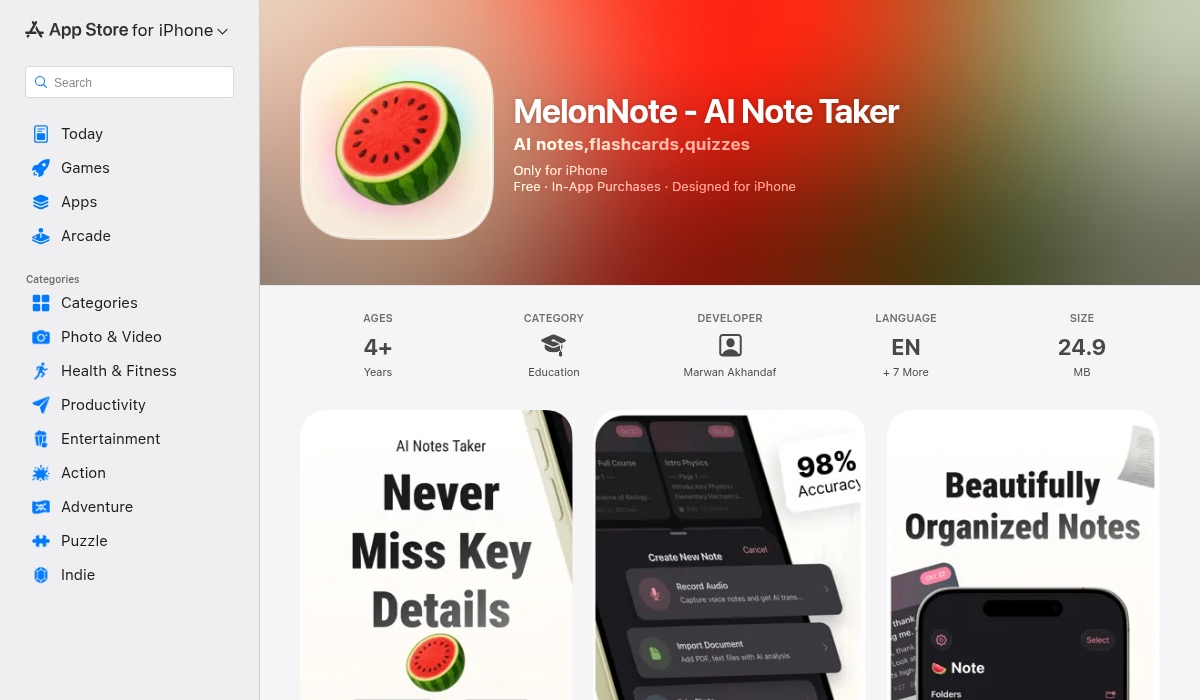
MelonNote is the closest thing to having a personal study assistant that does all the grunt work for you. Here's the workflow: record your lecture, and the app transcribes it using AI. From that transcript, it automatically generates a summary, flashcards, and practice quizzes. Then you can chat with an AI tutor about the material or even listen to an AI-generated podcast that discusses your notes.
Yes — it turns your lecture notes into a podcast. Two AI hosts discuss your study material in a conversational format, which is surprisingly effective for learning on the go.
- ✅ Record lectures with AI transcription (OpenAI Whisper)
- ✅ Import PDFs and photos (whiteboards, handwritten notes)
- ✅ Auto-generate summaries, flashcards, and quizzes
- ✅ AI tutor chat — ask questions about your material
- ✅ AI podcast generator — turns notes into 2-person discussions
- ✅ Realtime AI conversation mode (like a study buddy)
- ✅ Visual summary generation (AI infographics)
- ✅ Cross-platform: iOS and Android
- ✅ Most affordable: $3.99/month (vs $10–20/month competitors)
What makes MelonNote stand out from the crowd is the sheer breadth of AI features in one app. Most study apps do one thing — Otter records, Quizlet makes flashcards, Anki does spaced repetition. MelonNote combines lecture recording, transcription, note-taking, flashcards, quizzes, AI tutoring, and podcast generation into a single app. For students juggling five different tools, that consolidation alone is worth it.
The multi-select study sets feature is particularly clever. You can combine notes from multiple lectures into one set and generate flashcards or quizzes that cover an entire unit — perfect for midterm and final exam prep.
Download MelonNote on the App Store →
2. Google NotebookLM — The Research Powerhouse
Google's NotebookLM made waves when it launched its "Audio Overview" feature that generates podcast-style discussions from your documents. Upload your lecture slides, textbook chapters, or research papers, and it creates an engaging conversation between two AI hosts.
- ✅ Powered by Google's AI (Gemini)
- ✅ Upload multiple source types (PDFs, docs, web pages)
- ✅ Audio overview (podcast generation)
- ✅ Source-grounded answers (cites your materials)
- ❌ Web-based primarily — mobile experience is limited
- ❌ No flashcard or quiz generation
- ❌ No lecture recording capability
NotebookLM is excellent for research and reference, but it lacks the active study tools (flashcards, quizzes, spaced repetition) that are essential for exam prep. It's best used alongside a dedicated study app rather than as a replacement.
3. Otter.ai — The Transcription Specialist
Otter.ai has been the go-to lecture transcription tool for years, and for good reason. Its real-time transcription is fast and accurate, it can join your Zoom meetings automatically, and it highlights key points in your transcripts.
- ✅ Best-in-class real-time transcription
- ✅ Auto-join Zoom/Teams/Meet meetings
- ✅ Speaker identification
- ✅ Summary generation
- ❌ No flashcard or quiz generation
- ❌ Expensive: $16.99/month for Pro
- ❌ Transcription-focused — you need other apps for studying
Otter does transcription better than almost anyone, but that's where it stops. You'll still need a separate tool for flashcards, quizzes, and active recall — which is where an all-in-one solution like MelonNote has a clear advantage, especially at a quarter of the price.
4. Anki / Quizlet — The Flashcard Veterans
No study app roundup is complete without mentioning Anki and Quizlet. Anki is the gold standard for spaced repetition — free, open-source, and endlessly customizable. Quizlet is more user-friendly with a modern interface and AI-assisted card generation.
- ✅ Anki: Free, powerful spaced repetition algorithm
- ✅ Quizlet: Clean UI, community-shared decks, AI features
- ❌ Anki: Steep learning curve, dated interface
- ❌ Quizlet: $7.99/month for AI features
- ❌ Both: Manual card creation still required (or separate AI tool)
These are proven tools, but they're single-purpose. You need to create or import your flashcards from somewhere else. The new generation of AI study apps (like MelonNote) bake flashcard generation into the note-taking process itself — record → transcribe → generate cards, all in one flow.
How to Actually Study Smarter With AI
Having the right tools is step one. Using them effectively is where the magic happens. Here's a workflow that combines AI tools with proven study science:
- Record every lecture — Open MelonNote and hit record. Don't worry about taking perfect notes in real time — the AI will handle transcription and summarization.
- Review summaries within 24 hours — The "forgetting curve" shows you lose 70% of new information within 24 hours if you don't review. Read the AI-generated summary the same day.
- Generate flashcards immediately — Let AI create your flashcard deck from the lecture. Edit any cards that need refinement — this editing process is itself a form of active recall.
- Take practice quizzes before re-reading — Counterintuitively, testing yourself before you feel "ready" is more effective than re-reading notes. Use AI-generated quizzes to identify knowledge gaps.
- Use podcast mode for commutes — Turn your notes into an AI podcast and listen during walks, commutes, or gym sessions. It's passive reinforcement that adds up.
- Chat with the AI tutor for confusion — When something doesn't click, ask the AI tutor. It has context from your specific notes, so the answers are relevant — not generic.
"I started recording all my lectures with an AI note app and generating flashcards automatically. Went from a 3.1 to a 3.7 GPA in one semester. The time I saved on making study materials I actually spent studying."— Reddit user in r/studytips
AI Study App Comparison: What Matters Most
When choosing an AI study app, focus on these factors:
- Input flexibility — Can it handle audio, PDFs, photos, and text? The more input types, the more useful it is across different classes.
- Active recall tools — Flashcards and quizzes are non-negotiable. If an app only summarizes but doesn't test you, it's only doing half the job.
- Price — Student budgets are tight. MelonNote at $3.99/month offers the best value-to-feature ratio. Otter at $16.99/month is hard to justify for students.
- Cross-platform — If you switch between iPhone and Android (or use both), check compatibility. MelonNote works on both; most competitors are iOS-only.
- AI quality — Not all AI summaries are equal. Test with a complex lecture to see if the app captures nuances or just skims the surface.
The Bottom Line
AI study tools in 2026 are genuinely transformative — not because they study for you, but because they eliminate the busywork that prevents you from studying effectively. The hours you used to spend creating flashcards, re-reading notes, and organizing materials can now be spent on what actually improves grades: active recall and practice.
If you're going to try one app, start with MelonNote. It covers the entire study pipeline — from lecture recording to AI-generated podcasts — for less than the price of a coffee. Your future self (and your GPA) will thank you.