
Photo Calorie Tracking: Does It Really Work in 2026?
Snap a photo of your meal and instantly know the calories — sounds too good to be true, right? That's exactly what millions of people are wondering as AI-powered food scanning apps flood the App Store.
Photo calorie tracking has become the hottest trend in nutrition apps. Instead of manually searching databases and weighing portions, you just point your camera at your plate. The AI does the rest. But here's the million-dollar question: does it actually work?
We spent weeks testing the most popular photo calorie tracking apps to find out. The results were surprising — and not always in a good way.
Why Everyone Wants Photo-Based Calorie Tracking
Let's be honest: traditional calorie counting is tedious. You have to search through massive food databases, estimate portion sizes, and spend 5-10 minutes logging every single meal. Most people give up within the first week.
The promise of photo tracking is irresistible. Take a picture. Get calories. Done. It removes the biggest barrier to consistent tracking — the time and effort required.
"I am seeing apps that take a photo of your food and count calories. No chance they are accurate. What do you think?"— Reddit user in r/naturalbodybuilding
This skepticism is everywhere. And honestly? It's warranted. The technology has come a long way, but it's far from perfect.
How Photo Calorie Tracking Actually Works
Modern food scanning apps use computer vision and AI to analyze your photos. Here's the process:
- Image recognition — The AI identifies what foods are on your plate (chicken, rice, broccoli, etc.)
- Portion estimation — Using reference points and depth analysis, it estimates how much of each food is present
- Nutritional lookup — It matches identified foods against a database to pull calorie and macro data
- Final calculation — Everything gets tallied into a total estimate
The technology has improved dramatically with large language models like GPT-4. Some apps can now identify complex dishes, account for cooking methods, and even recognize cultural foods that weren't in traditional databases.
The Accuracy Problem — What the Research Says
Here's where things get complicated. Photo-based calorie estimation faces several fundamental challenges:
- Hidden ingredients — Oils, sauces, and butter add hundreds of calories that cameras can't see
- Portion depth — A 2D photo can't accurately measure the height of food piled on a plate
- Similar-looking foods — White rice vs. cauliflower rice? The calorie difference is massive
- Preparation methods — Fried vs. grilled chicken looks similar but differs by 100+ calories per serving
"The accuracy rate of such a method is extremely poor. If it was reasonably accurate, it would be an innovation that would destroy multiple industries in months."— Reddit user in r/loseit
Studies have shown that even trained nutritionists struggle to estimate calories from photos alone, with errors ranging from 20-40%. AI apps face the same limitations — they're essentially making educated guesses based on visual data.
When Photo Tracking Works Well
That said, photo calorie tracking isn't useless. It excels in specific situations:
- Packaged foods with barcodes — Scanning a barcode gives you exact nutritional data
- Simple, single-ingredient meals — A plain chicken breast or apple is easy to identify and estimate
- Relative tracking — Even if absolute calories are off, you can still see if you're eating more or less than yesterday
- Building awareness — Just the act of photographing meals makes you more conscious of what you eat
For many people, "good enough" tracking beats no tracking at all. If photo scanning helps you stay consistent, the minor accuracy trade-off might be worth it.
Best Apps for Photo Calorie Tracking in 2026
We tested the major players to see how they stack up. Here's what we found:
1. MyFitnessPal
The veteran of calorie tracking recently added AI photo scanning to its premium tier. It has the largest food database in the industry — over 14 million foods.
- ✅ Massive food database
- ✅ Barcode scanner works great
- ✅ Integration with fitness trackers
- ❌ Photo AI is premium-only ($19.99/month)
- ❌ Users report the AI "dramatically overestimates calories"
- ❌ Many features now paywalled
"A lot of people moved away from MyFitnessPal because too much is paywalled now."— Reddit user in r/CICO
2. Foodvisor
One of the pioneers in AI food recognition, Foodvisor has been refining its technology for years. It's designed specifically around photo-first tracking.
- ✅ Purpose-built for photo tracking
- ✅ Good at identifying European foods
- ✅ Nutritionist support in premium
- ❌ Struggles with complex dishes
- ❌ Smaller database than competitors
- ❌ Premium pricing ($9.99/month)
3. Zwintji — AI Calorie Scanner
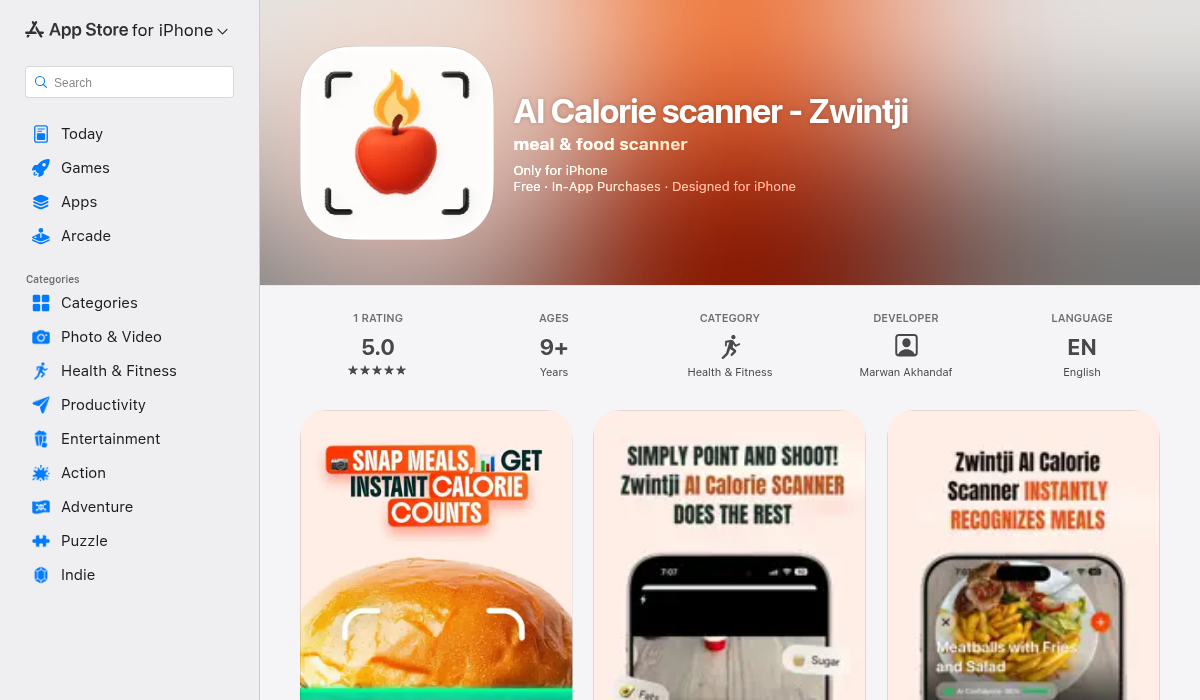
Zwintji takes a hybrid approach that addresses the biggest accuracy concerns. It combines AI meal scanning with traditional barcode scanning for packaged foods — giving you the best of both worlds.
- ✅ AI meal scanning with ingredient recognition
- ✅ Barcode scanner for packaged foods (exact data)
- ✅ Personalized goals and insights
- ✅ Workout tracking integration
- ✅ Clean, modern interface
- ✅ Affordable pricing
What sets Zwintji apart is its transparency. When you scan a meal, it shows you exactly what ingredients it detected and lets you adjust portions before confirming. This "AI + human verification" approach significantly improves accuracy over fully automated systems.
The app also tracks your eating patterns over time and provides personalized nutritional insights — something most photo-only apps skip entirely.
Pro Tips for More Accurate Photo Tracking
Regardless of which app you choose, these techniques will improve your results:
- Use barcodes when available — For packaged foods, always scan the barcode instead of taking a photo. It's 100% accurate.
- Photograph before mixing — Snap ingredients separately before combining them into a salad or stir-fry.
- Include a reference object — Some apps work better when you include a fork or credit card for scale.
- Verify and adjust — Don't blindly accept AI estimates. Review what the app detected and correct obvious errors.
- Log cooking oils separately — The camera can't see the tablespoon of olive oil you used. Add it manually.
- Be consistent — Even if your tracking isn't perfect, consistent slight over- or under-estimation still shows trends.
Traditional vs. AI Tracking — Which Should You Use?
Here's our honest recommendation based on your goals:
Choose traditional manual logging if:
- You need precise macros for bodybuilding or competition prep
- You cook most meals at home with measured ingredients
- You don't mind spending 5-10 minutes per meal logging
Choose AI photo tracking if:
- You eat out frequently or have unpredictable meals
- You've failed at manual tracking due to tedium
- You want general awareness rather than exact numbers
- Consistency matters more to you than precision
Choose a hybrid app like Zwintji if:
- You want flexibility — photos for fresh meals, barcodes for packaged foods
- You value accuracy but don't want to spend forever logging
- You want personalized insights, not just raw numbers
The Bottom Line
Photo calorie tracking is a real tool with real limitations. It's not magic — the AI makes educated guesses that can be off by 20% or more. But for many people, "pretty good" tracking that you'll actually stick with beats "perfect" tracking that you abandon after three days.
The key is understanding what you're getting. Use barcodes for packaged foods. Verify AI estimates before accepting them. Log hidden calories like oils manually. And most importantly, focus on consistency over precision.
If you're looking for an app that balances convenience with accuracy, Zwintji offers a smart hybrid approach — AI scanning for meals, barcode scanning for packages, and personalized insights to help you actually reach your goals.
The best calorie tracking app is the one you'll actually use. Sometimes that means embracing "good enough" technology to build habits that last.